
Part of The Folder’s After You Sign series — see them all →
Getting Started
Who Should See What: Setting Up Permissions in The Folder
Putting everything in one place sounds like it means everyone sees everything. It doesn't have to.
Good to know
Questions, answered.
What are my actual options for sharing this information?
Traditionally, two options, and both have a real downside. Hand someone a full binder or a list of passwords, and you've lost control of sensitive information the moment it leaves your hands. Tell people nothing, and you've left them with a scavenger hunt if something happens to you. Neither one actually serves the goal, which is: the right person can find the right thing, without seeing everything else.
How does access actually work in The Folder?
Through a key, given to one person at a time. Not a shared password, not a link that works for anyone who has it — an individual key for each person, scoped to exactly what you decide they need. You choose what that includes, and you can change it whenever you want.
What does this actually look like for a real family?
Say one of your kids is the one who handles everyone's tech support. It makes sense to give them access to your devices and password information — not your bank balances. Your attorney, on the other hand, probably needs your documents and maybe your financial advisor's contact information, but has no reason to see your retirement account balance. Same information, same platform, completely different keys for different people.
How granular can this actually get?
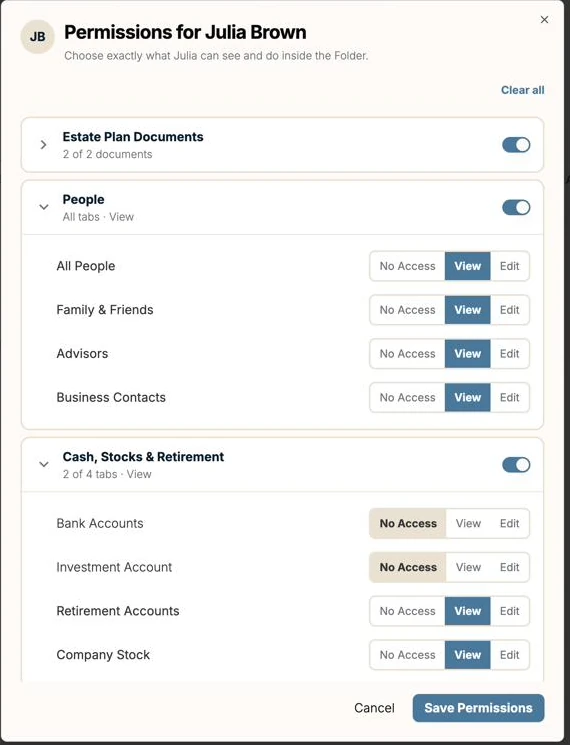
More than most people expect. Access isn't just on or off for a whole category — within something like your financial information, you can set Bank Accounts, Investment Accounts, Retirement Accounts, and Company Stock separately, each with its own level: No Access, View, or Edit. Someone can see your bank accounts without ever seeing your investments, if that's what makes sense for them.
What roles does The Folder actually recognize?
Beyond generic access, The Folder tracks the specific roles your plan may already name — Personal Representative, Successor Personal Representative, Trustee, Successor Trustee, Healthcare Proxy, and Financial POA Agent — plus two roles worth calling out because they're easy to overlook. Assigning these roles up front makes it obvious who's missing, instead of realizing it later.
- Guardian, if you have minor children
- Digital Executor — a role your legal documents may not name at all, but that most families need in practice: someone responsible for accounts, passwords, and subscriptions, who isn't necessarily the same person handling the legal estate
What if I change my mind about someone's access?
Revoke it — instantly, from your end, no conversation required if you'd rather not have one. That's meaningfully different from paper: once you've handed someone a physical copy of something, you can't take it back if the relationship changes. A digital key can be turned off the moment it no longer makes sense.
Where should I actually start?
Don't try to build the perfect permission structure on day one.
- Assign the roles you already know — personal representative, trustee, healthcare proxy, and the rest
- Give at least one person — a spouse, a close family member — broad access as a starting point
- Add narrower keys as it makes sense: your tech-savvy relative, your attorney, a sibling who's only involved in one part of things
- Revisit who has access to what once a year, the same way you'd revisit the rest of your plan
Quick checklist
- Key roles assigned (personal representative, trustee, healthcare proxy, guardian, digital executor)
- At least one person has broad access
- Narrower access set up for specialists — tech help, attorney, advisors
- Access reviewed at least once a year
“The goal isn't to give everyone a map to everything. It's to make sure the right person can find the right thing, without ever having to go looking for it.”
Start today
Life changes.
Your plan should too.
Start with the plan you already have. The Folder helps you understand it, keep it current, and make sure your family knows what they’ll need when the time comes.
Free for 30 days
No credit card required.
Then $349/year, less than $1 a day. Billed annually.
✓ Everything in The Folder, included
✓ SOC 2 · bank-level encryption
✓ Invite the people you trust
Have a code from your firm?
Encrypted · never sold · you control access